Component model
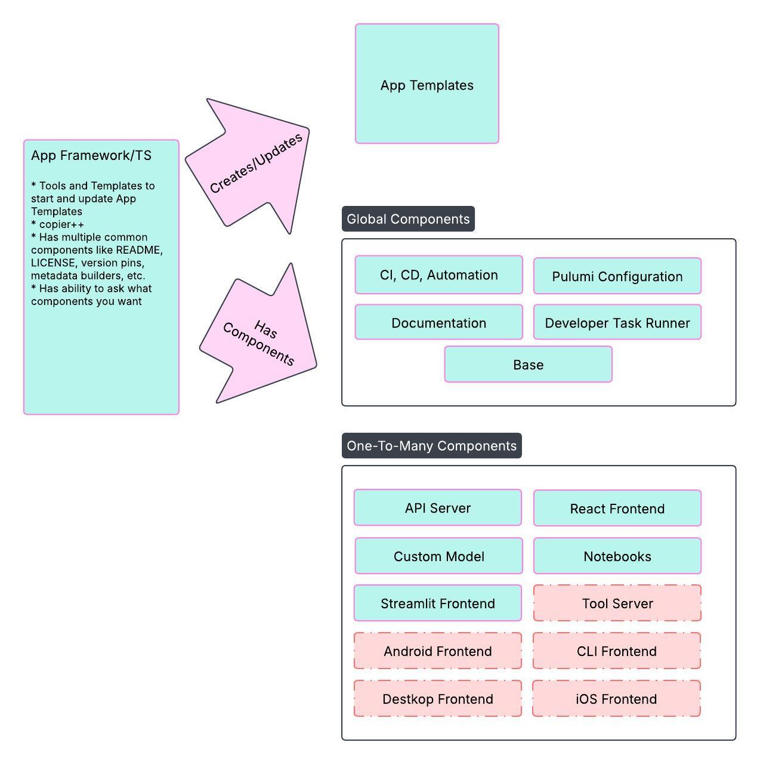
The App Framework Template Studio is the templating and update-management layer behind the component system described in these docs. It solves two core problems:
- Maintenance at scale — A bug fix to five foundation application templates with 100 applications per template means the fix needs to reach 500 cloned applications. Manual propagation does not scale.
- Template creation speed — Standing up an AI blueprint on DataRobot quickly requires good building blocks.
Components are copier-style templates. Each is a top-level folder or file set added to a recipe. Answers given during template application are recorded in .datarobot/ as YAML, enabling future automated updates at the component-instance level.
Global components
These appear once per application template:
| Component | Repository | Description |
|---|---|---|
| Base | af-component-base | The infra/ Pulumi project every other component extends, .datarobot/ configuration, an optional shared core library, CI scaffolding. |
| LLM | af-component-llm | LLM Gateway or external model integration via the DataRobot LLM Deployment. |
One-to-many components
These can be applied multiple times while building out the template:
| Component | Repository | Description |
|---|---|---|
| FastAPI Backend | af-component-fastapi-backend | Local development tasks, FastAPI API documentation, and Pulumi configuration for Custom Application deployment. |
| React Frontend | af-component-react | Development server, API proxy, static asset build, and prebuilt tests. |
| Agent | af-component-agent | CrewAI, LangGraph, LlamaIndex, or YAML-based NeMo Agent Toolkit. |
| DataRobot MCP | af-component-datarobot-mcp | FastMCP server with DataRobot predictive tools and third-party integrations. |
Technical underpinnings
The component model is built on Copier. Similar to Yeoman or Cookiecutter, but with Git semantics that make updates after copying the template part of the workflow.
Update model
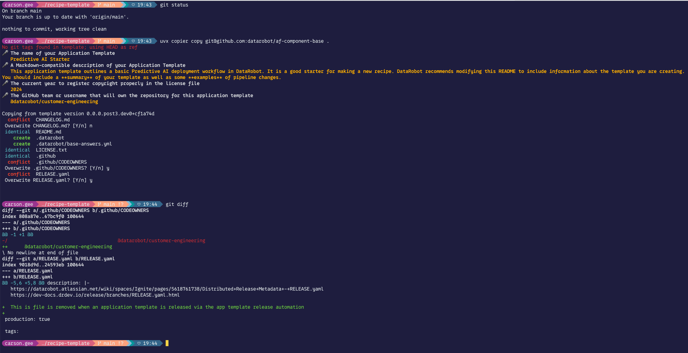
The App Framework uses copier and git fork semantics to keep things updated.